Website Login Help
The information on this page is intended to assist new users with logging into the HARMONEE Website. The HARMONEE Website is intended to support the Government of Australia, New Zealand, Canada, the United Kingdom, and the United States.
Email Assistance: web@harmonee.osd.mil.
General Login Guidance
Request Website Account:
Register a PKI digital certificate to your existing account:
Register an RSA SecurID Client to your existing account:
Add a PIN to your new RSA SecurID authenticated account:
Many account operations involve the website system sending a verification Code to the registered email address associated with the account.
- There can be a delay of several minutes in receiving this email.
- If the registered email address is no longer functioning or accessible, contact support at web@harmonee.osd.mil.
Under some circumstances, an account may be "locked" and after logging into the website the user will be notified of the locked status.
- Users of locked accounts are presented with a Request Unlock link to request their account to be unlocked.
Configuring RSA SecurID Authentication
Register for a new account or register your RSA client for an existing account.
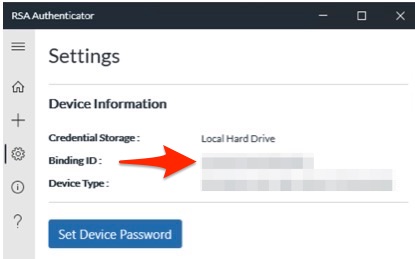
To Retrieve the Binding ID for Windows
Retrieve the Binding ID from the Settings panel.
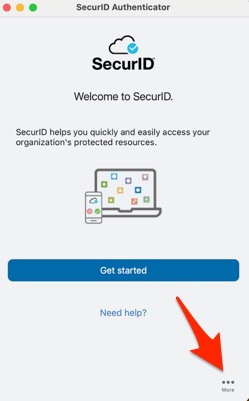
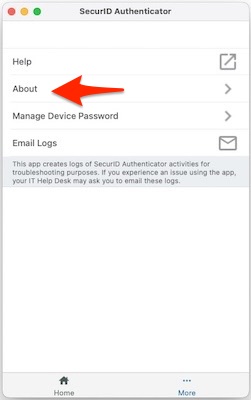
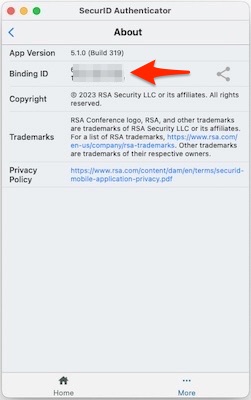
To Retrieve the Binding ID for macOS
Retrieve the Binding ID by clicking More > About.
You will receive an email with an Invitation File (.stdid) containing your Authentication Token. Follow the instructions in the email to complete the setup of the RSA Authenticator application.
Let us know if you encounter any problems.
Typical Login Problems
Due to security considerations, the website is not permitted to disclose the existence of usernames, email addresses, or the status of website accounts. Unfortunately, this often results in not very helpful error messages. If assistance is required, don't hesitate to send an email to web@harmonee.osd.mil.
Certificate Login Errors (Missing Client Certificate, Internal Server Error, Network Error)